
What Is Video AI Metadata?
Video AI metadata is provenance data that AI generators and video editors write into a video file to record that AI made or changed it. Instagram, TikTok, YouTube, LinkedIn, and Pinterest read it and show an AI label or icon on your post. This tool finds those records in your browser, deletes them, and saves a copy that looks and sounds the same.
Metadata is text inside a file that describes the file. Provenance is the record of where the file came from.
Steps to Remove Video AI Metadata
Choose the video, read the report, and save the cleaned copy: the tool strips the AI records without re-encoding the picture or the sound. MP4 and MOV are the common file formats for video from phones, editors, and AI generators. To re-encode means to compress the picture again, and each pass costs quality.
The work happens in your browser. The file is never uploaded, so no copy sits on a server. The page shows ads and uses site analytics, as every page of this site does.
How do I remove AI metadata from a video?
- Choose a video. Drop an MP4, MOV, or M4V file on the tool, or use the Choose video button. The tool takes one video at a time, up to 256 MB.
- Examine and clean. The report lists each record it found, such as Content Credentials (C2PA), XMP metadata, an AI label (AIGC), or an AI tag in the video stream. Then select Clean video.
- Save. The copy keeps your file name with
- Removedadded, sotrip.mp4becomestrip - Removed.mp4.
Upload the saved copy to the platform, not the original.
In Chromium on an M-series Mac, the 44 MB Kling sample from this page took 24 milliseconds to examine and 196 milliseconds to clean (measured 12 Nov 2026).
Which video AI metadata does the tool delete, and what does it keep?
The tool deletes every AI record it finds and strips the metadata that names your place, time, and device. It keeps the picture, the sound, and the data a player needs.
The 5 AI records it deletes:
- C2PA manifest (Content Credentials), the whole box
- XMP packet, which holds the Digital Source Type value
- AIGC label from Chinese AI tools
- AI tags inside the video stream, such as Kling's
kling-ai - Generator and encoder names in text tags, such as
©tooandencoder
The same pass clears general video metadata: GPS location, device make and model, software version, recording date, title, author, and comment. The dates in the file headers change to the time of the clean.
The picture, the sound, the rotation, the subtitles, HDR, the file brand, and the track handler names such as VideoHandler stay. The report shows anything the tool keeps, such as a GPS track that stabilization reads, with the reason.
How can I check that the video AI metadata is gone?
Open the cleaned file in a metadata reader and confirm that the C2PA manifest and the DigitalSourceType field are missing. Three free checkers do this: ExifTool, c2patool, and the Content Credentials Verify site.
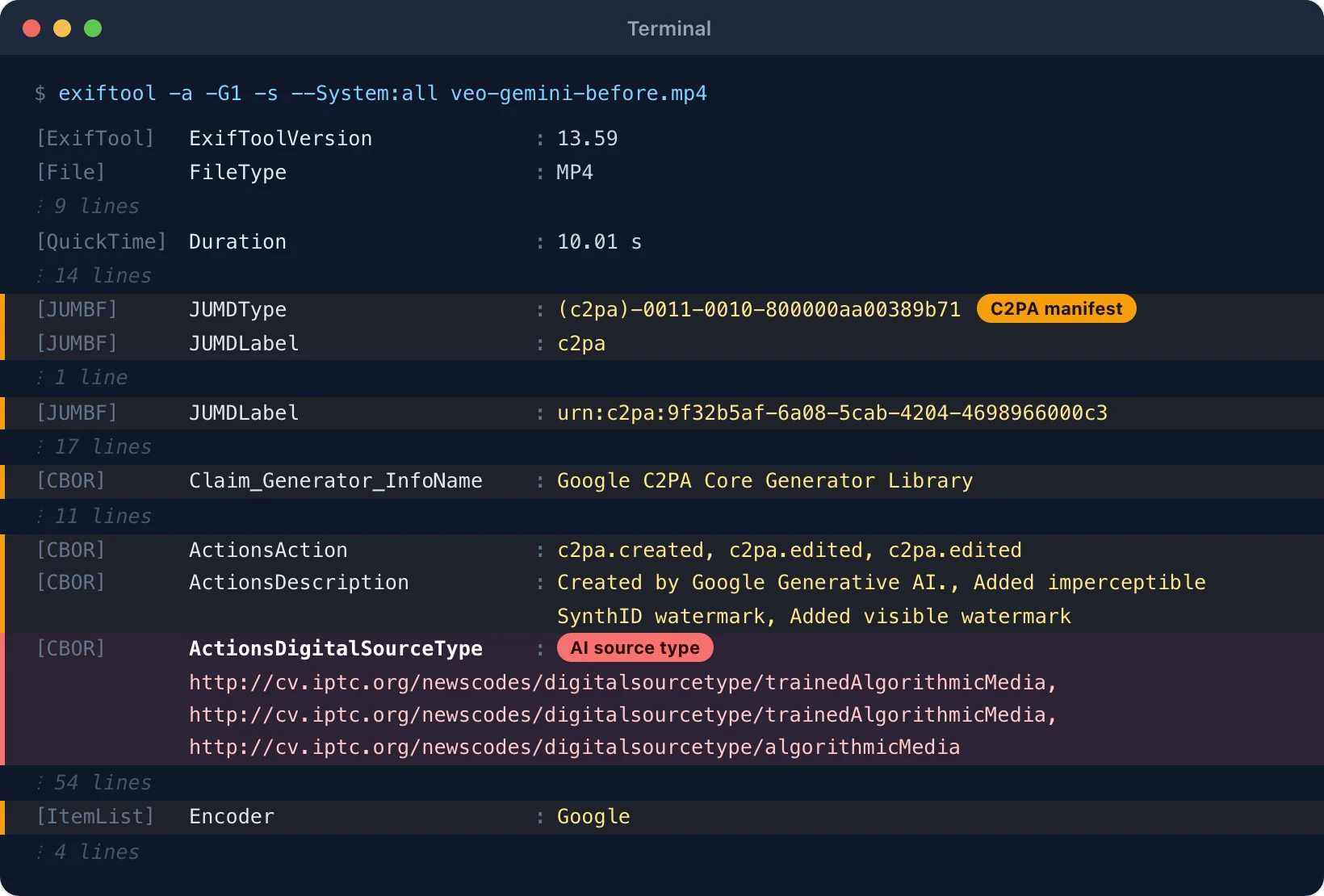
I ran the first two on a 10-second clip from the Gemini app, which uses Google's Veo model. Before the clean, exiftool -a -G1 -s printed 121 lines. 36 of them sat in the JUMBF and CBOR groups, which is how ExifTool shows a C2PA manifest:
[CBOR]          Claim_Generator_InfoName        : Google C2PA Core Generator Library
[CBOR]          ActionsAction                   : c2pa.created, c2pa.edited, c2pa.edited
[CBOR]          ActionsDigitalSourceType        : http://cv.iptc.org/newscodes/digitalsourcetype/trainedAlgorithmicMedia, http://cv.iptc.org/newscodes/digitalsourcetype/trainedAlgorithmicMedia, http://cv.iptc.org/newscodes/digitalsourcetype/algorithmicMedia
[ItemList]      Encoder                         : Google
After the clean, the same command printed 82 lines. The JUMBF and CBOR groups and the Encoder line are gone, and c2patool answers with one line:
Error: No claim foundYou can repeat the check on the same files:
- Veo clip before cleaning (MP4, 7.0 MB)
- Veo clip after cleaning (MP4, 7.0 MB)
- ExifTool output before and after
- c2patool output before and after
Use c2patool 0.29.0 or newer: version 0.9.12 cannot read the Veo manifest and prints Error: claim could not be converted from CBOR. Look for the field in both places it can sit. In an XMP packet ExifTool calls it XMP-iptcExt:DigitalSourceType. Inside a C2PA manifest it shows as CBOR:ActionsDigitalSourceType.
Video AI Metadata Labels: The Exact AI Tag Each Platform Shows
Each platform prints its own AI label when it reads AI metadata in an uploaded video, and the wording is different on every app.
| Platform | Exact label text | Where it shows | What the platform says it reads |
|---|---|---|---|
| Instagram, Facebook, Threads | "AI info" | On the post for AI-made content. In the post menu for AI-edited content. | "Industry standard AI image indicators" plus the creator's own disclosure |
| TikTok | "AI-generated" (added by TikTok) and "Creator labeled as AI-generated" (added by the creator) | Under the username on the video | C2PA Content Credentials |
| YouTube | "Made with AI" | Below the player on long videos. As an overlay on Shorts. | Creator disclosure, C2PA 2.1 or higher, and YouTube's own signals |
| Content Credentials icon (the small "Cr" mark) | In the corner of the image or video | Signed C2PA Content Credentials | |
| "AI modified" | Bottom left of the Pin in close-up | IPTC metadata plus Pinterest's own classifiers |
The fix works the same way on all 5: each platform reads the record from the file you upload. A cleaned file holds no record, so a metadata label has nothing to read.
Why does Instagram show "AI info" on a Reel or video?
Instagram shows "AI info" when Meta finds AI metadata in the file, mainly a C2PA manifest or an IPTC Digital Source Type value, or when the creator adds the AI label.
Meta renamed "Made with AI" to "AI info" on 1 July 2024 and changed the placement on 12 Sept 2024. The label stays on the post for content that an AI tool generated. It moves into the post menu for content that was only edited with AI. The same label runs on Facebook and Threads. Meta describes the trigger as "industry standard AI image indicators", and its post of 6 Feb 2024 names the C2PA and IPTC standards.
What the tool deletes: the C2PA manifest and the XMP packet that holds the Digital Source Type value.
Why does TikTok show "AI-generated" on a video?
TikTok adds the "AI-generated" label by itself when an uploaded video carries C2PA Content Credentials that mark it as AI made.
TikTok began to read Content Credentials on 9 May 2024. The label a creator adds reads "Creator labeled as AI-generated", so the two strings tell you who applied it.
What the cleaner strips: the C2PA manifest in the file you upload.
Why does YouTube show "Made with AI" on a video or Short?
YouTube adds its AI label when the creator discloses AI, when the video was made with YouTube's own AI tools, or when the file's Content Credentials say the whole video is AI made.
YouTube's help page names the label "Made with AI" and asks for Content Credentials of C2PA version 2.1 or higher (checked 15 Nov 2026). In a post dated 27 May 2026, YouTube moved the label below the player on long videos and onto the video as an overlay on Shorts. The same post says YouTube now applies a label automatically when its systems detect significant photorealistic AI use. The post names 2 cases where the label is permanent: videos made with Veo or Dream Screen, and files whose C2PA metadata marks them as fully AI generated. Creators can update other labels in YouTube Studio.
What a clean wipes: the C2PA manifest, so a new upload does not carry the "entire video is AI" claim. A permanent label on a published video belongs to YouTube's copy and stays with it.
What does the "Cr" icon on a LinkedIn video mean?
The "Cr" icon means the video carries signed C2PA Content Credentials, and LinkedIn shows the credential details when a viewer clicks it.
LinkedIn's help page calls it "the C2PA icon". A click shows whether AI generated or edited the content, the app or device used, who created it, and who issued the credential and when. LinkedIn also says it cannot yet identify and label all AI content. For video, C2PA was still largely an opt-in system at the tool level (Fortune, 26 Nov 2024), so an AI video often carries no icon at all. The icon marks provenance in general, so a camera original with credentials gets it too.
What the tool erases: the C2PA manifest, the one thing the icon depends on.
Does Pinterest add "AI modified" to video Pins?
Pinterest adds "AI modified" to a Pin when it finds AI metadata in the file or when its own classifiers detect AI content.
Pinterest launched the label on 30 April 2025, and its announcement names image Pins. The label shows at the bottom left when you open a Pin in close-up. The help page says Pinterest reads a Pin's metadata against the IPTC standard and also runs classifiers that detect AI content with no marker in the file. A creator can appeal a label through Pinterest support.
What the tool clears: the XMP packet with the Digital Source Type value that Pinterest's metadata check reads.
Can I fix an AI label after the video is posted?
Not on the live post. A clean works on your file, so a label already on a post stays until you appeal it or post the cleaned file again.
Each platform has its own position:
- TikTok says a label it applied stays on the post.
- YouTube lets you update the disclosure in YouTube Studio, unless the label is one of the permanent ones.
- Pinterest takes appeals through its support team.
- Meta lets you remove a label you added yourself.
A new post of the cleaned file is the fix for a wrong label, for example real footage that got a tag after one small AI edit. The disclosure rules at the end of this page still apply to the new post.
Video AI Metadata Types: The Records Inside MP4 and MOV Files
A video can carry 5 types of AI metadata: a C2PA manifest, an IPTC Digital Source Type value in XMP, generator names in QuickTime text tags, the AIGC field that Chinese AI tools write, and an AI tag inside the video stream. The tests for this page found the fifth type in Kling exports. Metadata readers such as ExifTool do not show it.
What is a C2PA manifest in a video?
A C2PA manifest is a signed record, stored inside the video file, that lists which tool made the video and which actions changed it. C2PA is the Coalition for Content Provenance and Authenticity, the group that writes the standard. Content Credentials is the public name for the same record. Signed means the maker locks the record with a private key. A checker can then prove who wrote it and can see any later change to the record or to the video.
The Veo sample shows what one holds. Its manifest names "Google C2PA Core Generator Library" as the generator and lists 3 actions. Google LLC signed it on 2 Oct 2026 at 15:46:19 UTC. The manifest also stores a hash of the video data, and c2patool 0.29.0 confirmed both parts with claimSignature.validated and assertion.bmffHash.match. The specification is public at spec.c2pa.org, and version 2.4 is dated April 2026.
What does Digital Source Type "trainedAlgorithmicMedia" mean in a video?
trainedAlgorithmicMedia is the IPTC value that tells software a video was made by a trained AI model. IPTC is the news industry body that maintains metadata standards for media. The full value is http://cv.iptc.org/newscodes/digitalsourcetype/trainedAlgorithmicMedia, and IPTC defines it as "Digital media created algorithmically using an Artificial Intelligence model trained on captured content".
The sibling value compositeWithTrainedAlgorithmicMedia marks real footage with AI parts. IPTC's label for it is "Edited using Generative AI".
IPTC's guidance of May 2023 tells AI tools to write the value into the XMP packet of image and video files. XMP is Adobe's format for metadata that travels inside a file as XML text. C2PA reuses the same word list inside its actions, and that is where Veo puts it. The Veo sample has no XMP packet at all. Its two trainedAlgorithmicMedia values sit only inside the signed manifest, and the third action carries algorithmicMedia.
What is the AIGC field that Chinese AI video tools write?
The AIGC field is a metadata label, defined by the standard GB 45438-2025, that AI tools from China such as Kling write into the files they generate. Appendix E of the standard sets the format: a field whose name includes AIGC, with a short JSON text as its value. The keys are Label, ContentProducer, ProduceID, ReservedCode1, ContentPropagator, PropagateID, and ReservedCode2. A Label of 1 means AI generated the content, 2 means it possibly did, and 3 means it is suspected.
I found the field in a Kling export dated 13 Oct 2026. ExifTool prints it like this (id shortened):
[Keys] AIGC : {"Label":"1","ContentProducer":"kling","ProduceID":"SGP_PROD_ai_web_3238…","ReservedCode1":null,"ContentPropagator":"kling","PropagateID":"SGP_PROD_ai_web_3238…","ReservedCode2":null}Kling does not put it in XMP. It sits in a QuickTime keys list at moov > udta > meta, next to the encoder name. A Kling export dated 23 Aug 2026 has no AIGC key at all, so do not assume every Kling file carries one. The tool reads the Label value for its verdict and strips the whole key.
Where does video AI metadata sit inside MP4 and MOV files?
MP4 and MOV files store metadata in boxes that sit beside the picture and sound data, which is why the records can be deleted without touching a single frame. A box is a labelled block of data inside the file. Each box starts with its size and a name of 4 letters.
| Record | MP4 | MOV |
|---|---|---|
| C2PA manifest (in JUMBF, the wrapper format C2PA uses) | Top-level uuid box with the type d8fec3d6-1b0e-483c-9297-5828877ec481, placed after ftyp and before moov | Same uuid box |
| XMP packet (Digital Source Type) | Top-level uuid box with the type be7acfcb-97a9-42e8-9c71-999491e3afac | moov > udta > XMP_ |
| Generator and encoder text tags | moov > udta > meta > ilst (for example ©too), or a keys list (keys and ilst) | Same boxes, plus Apple com.apple.quicktime keys |
| AIGC field | Keys list. In the Kling export: moov > udta > meta | Same keys list |
| Handler names | hdlr box inside each track | Same |
| AI tag in the stream | Inside mdat, in an H.264 SEI message | Same |
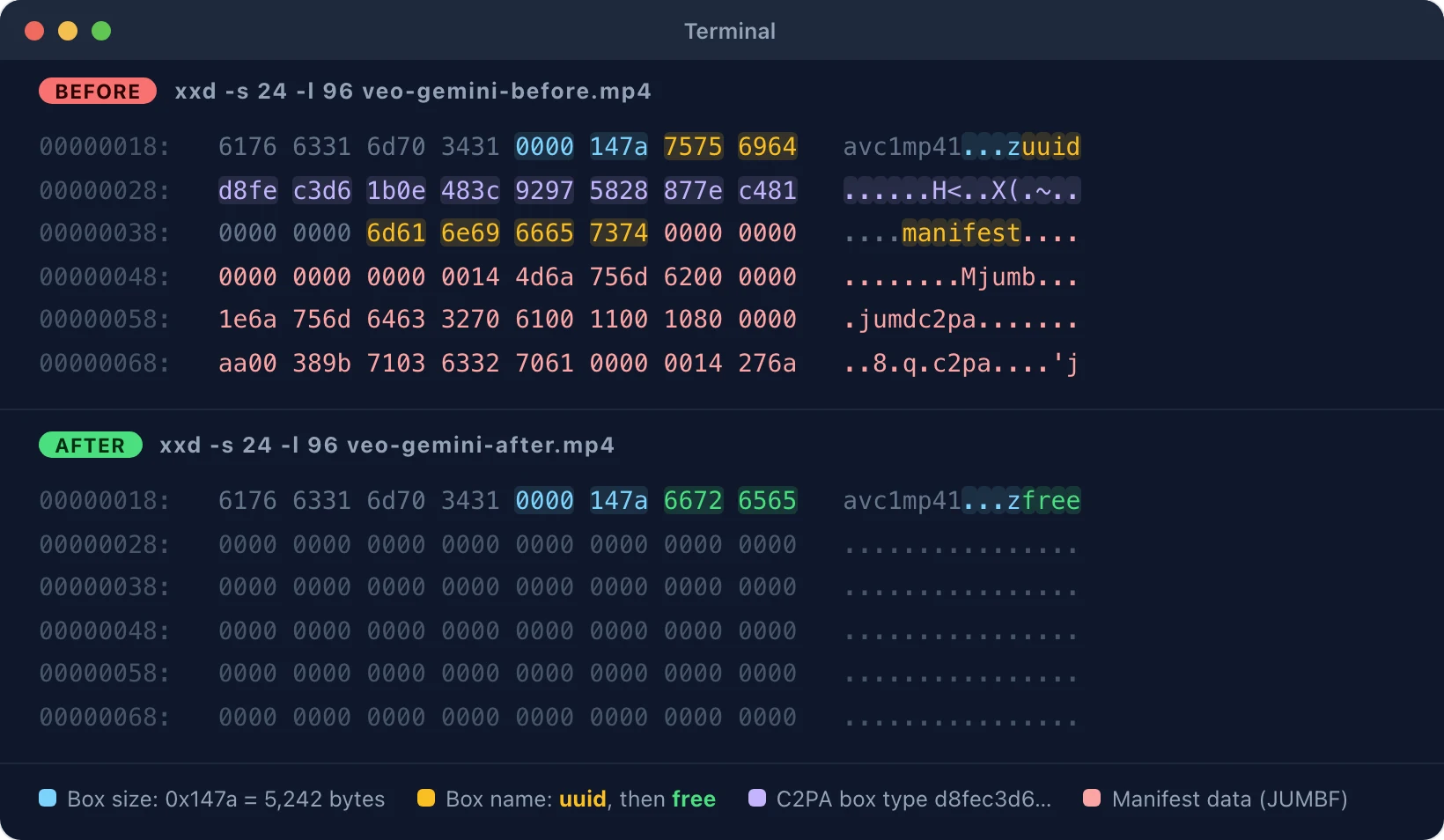
In a hex viewer, the Veo sample's ftyp box ends at byte 32. The next box calls itself uuid, then come the 16 bytes d8 fe c3 d6 1b 0e 48 3c 92 97 58 28 87 7e c4 81, then the word manifest. That box is 5,242 bytes long. moov starts at byte 5,274, and mdat, the box with the picture and sound, starts at byte 13,588 and holds 7,035,336 bytes.
In the cleaned copy the box at byte 32 calls itself free and holds only zeros. Every box after it starts at the same byte as before. That is why the cleaned file is still 7,048,924 bytes, and only 5,116 of those bytes differ.
One record sits outside the boxes. Kling writes the text kling-ai into the video stream, the picture data itself, as an H.264 SEI message. An SEI message is a side note between frames that a player skips. The tool blanks that note and leaves the picture data around it as it is.
Video AI Metadata Sources: Generators and Editors That Write It
Not every AI video tool writes AI records into its exports: of the 5 AI exports tested for this page, 3 carried a record and 2 carried none.
I checked 6 files on 15 Nov 2026, 5 from AI tools and 1 from a phone as the control.
| Generator or editor | C2PA manifest | Digital Source Type | Other tags | Files |
|---|---|---|---|---|
| Google Veo (Gemini app, 2 Oct 2026) | Yes, signed by Google LLC | trainedAlgorithmicMedia, inside the manifest | ©too encoder name Google | before, after |
| Kling (export of 13 Oct 2026) | None | None | AIGC key, kling-ai stream tag in frames 1 and 331, encoder name Lavf60.16.100 | before, after (44.4 MB each) |
| Kling (export of 23 Aug 2026) | None | None | kling-ai stream tag in frames 1 and 331, encoder name Lavf60.16.100 | before, after (35.2 MB each) |
| ChatGPT video (2 Oct 2026, 5 minutes) | None | None | None. Header dates only | Not hosted (192.6 MB) |
| Claude (animation rendered to MP4) | None | None | ©too encoder name Lavf60.16.100 | before, after |
| Android phone camera, no AI (control) | None | None | Software version, the phone maker's own data box, header dates | Not hosted (private clip) |
Every hosted file has its ExifTool, c2patool, and ffprobe output beside it under the same name, and SHA256SUMS.txt lists the checksums.
The ChatGPT and Claude rows show that a video from an AI tool can carry no record at all. For such a file, the tool's report says it found no AI marker.
OpenAI closed the Sora web and app version on 26 April 2026 and the Sora API on 24 Sept 2026. Closing the service changes nothing inside a file on your disk. A Sora video saved before those dates keeps the metadata it was exported with.
Why does a real video get an AI label after editing?
Editors write AI metadata into the whole export when one AI feature touches any part of the timeline, and platforms read that record as AI use.
Adobe's announcement of 16 July 2024 states the rule for its editors. Premiere Pro and Media Encoder include Content Credentials when you export a sequence that contains one or more Adobe AI-generated assets. On 25 Oct 2026, a user on Adobe's community forum reported the result. The only AI step in an After Effects project was a Firefly background removal on one image, and the finished video received an AI label on X. That is one user's report.
YouTube and Meta both treat edited footage more lightly than AI-made footage: YouTube's permanent label needs credentials that call the entire video AI made, and Meta puts the label for edited content in the post menu.
Video AI Metadata Removal Scope: Watermarks, Live Posts, and Quality
Removing video AI metadata cleans the records inside your file. A watermark in the picture, a label on a live post, and a platform's disclosure rules sit outside those records.
Does removing video AI metadata remove SynthID or a visible watermark?
No. SynthID and visible logos are part of the frames, and the tool keeps every frame as it is. SynthID is Google's invisible watermark, a mark in the picture itself. The Veo sample's manifest lists both marks in its actions, so the tool's end screen notes that the watermark stays in the picture.
Can a platform still label a cleaned video?
A cleaned video carries no AI record, so no label comes from its metadata on any platform. A platform can still label from its 2 other signals: its own detection, which YouTube and Pinterest run, and the creator's disclosure.
Does removing video AI metadata reduce video quality?
No. The tool copies the picture and sound data as stored, with no re-encode, so the quality stays the same.
I hashed the streams of each file with FFmpeg before and after the clean. A stream hash covers the compressed picture or sound data as stored. A decoded hash covers the frames a player shows.
| File | Size before and after | Video stream hash | Audio stream hash | Decoded frames hash | Bytes that differ |
|---|---|---|---|---|---|
| Veo | 7,048,924 bytes | Same | Same | Same | 5,116 |
| Kling, 13 Oct 2026 | 44,406,146 bytes | Differs | Same | Same | 349 |
| Kling, 23 Aug 2026 | 35,150,930 bytes | Differs | Same | Same | 125 |
| Claude animation | 3,489,459 bytes | Same | Same | Same | 86 |
| ChatGPT video | 192,566,352 bytes | Same | Same | Same | Not counted |
The two Kling rows show the one case where the stream hash changes. Kling's tag sits inside the video stream, so the tool blanks it there. The text kling-ai appears 2 times in each Kling file before the clean and 0 times after. The decoded frames hash the same, so the picture you see is identical.
The stream hashes and their commands are in the hash file beside each sample, for example veo-gemini.stream-hashes.txt. The decoded hash comes from ffmpeg -i <file> -map 0:v -f md5 -. Guides that strip metadata by re-encoding the video with FFmpeg change every frame and lose quality on every pass.
Is it legal to remove AI metadata from videos, and when must I still disclose AI?
No single law covers every country, so check the law where you live. Platform rules are the same everywhere: TikTok, YouTube, and Meta require creators to label realistic AI video, whatever the file's metadata says.
Removal is reasonable when the record is wrong or private. Examples are real footage that an editor tagged after one small AI step, project details you do not want to publish, and files you deliver to a client.
Do not remove AI records to pass realistic AI video off as real news, real evidence, or a real person.
For photos, the image tool can remove AI metadata from images. To read what a photo holds before you clean it, view image metadata online.
Disclaimer: you are responsible for how you use this tool. Laws differ by country, so check yours.